Author an SMS template
1. Open Comm. Templates → Add new template and pick SMS template.
2. Give it a Name (internal — not seen by members).
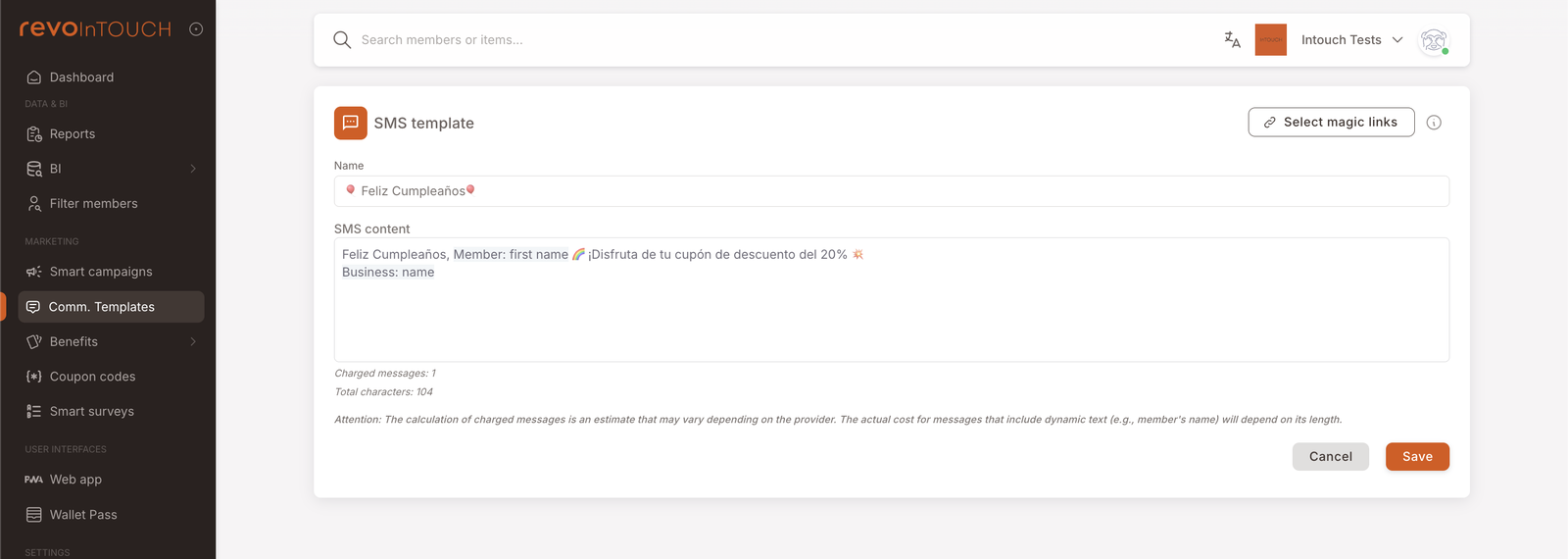
3. Type the SMS content. Use @ to insert dynamic fields (member first name, business name, etc.). Click Select magic links to insert a tracked URL.
4. Watch Charged messages and Total characters as you type — every 160 characters costs another segment.
5. Save.
The template is now Active and pickable from any Send SMS action on a Rule or Future Campaign.
An SMS template is a saved, named text body that Smart Campaigns reference when they want to send a member a text. Once saved, the template is available to every Send SMS action across every Rule and Future Campaign in the tenant.
Walkthrough
Open Comm. Templates in the left nav (under MARKETING), click Add new template, and pick SMS template as the kind.
Name
The Name is an internal label only — it's how the template appears in the list view and in the action picker on a campaign. Members never see it. Use something specific enough to find later (Birthday — happy birthday SMS, Cashback — thank-you SMS) rather than generic (Birthday text, Thank you).
SMS content
The SMS content is the body of the text. It's a single text field — no formatting, no rich text, no images.
Use @ to insert a dynamic field — placeholders that resolve per-recipient at send time. Common dynamic fields include:
- Member: first name — the member's stored first name.
- Business: name — the tenant's business name.
- Member: balance — the member's current credit / point balance (for accumulation reward messages).
The token appears in the editor with the dynamic-field name in brackets and a small marker; at send time it resolves to that recipient's value.
Magic links
Click Select magic links in the top right to insert a tracked URL into the body — a survey link, a coupon redemption page, a wallet-pass deep link. Magic links carry a per-member tracking key, so when the member taps the link you can attribute the action back to this campaign and this member. See the Comm. Templates overview → Magic links section for the concept.
Charged messages and Total characters
Two counters sit below the body:
- Total characters — literal character count of the resolved body (with dynamic fields treated as their token-length, not their resolved-value length).
- Charged messages — how many SMS segments the body bills as. SMS bills per 160-character segment; a body of 161 characters costs two segments to deliver, not one.
The counters are an estimate. The actual bill depends on the SMS provider and the resolved length of dynamic fields at send time — a member with a long first name can push a one-segment template into two segments for that send. The attention note below the body spells this out.
Save
Click Save in the bottom right. The template lands in the list view as Active and is immediately pickable from any Send SMS action.
Variations
4 common patterns — magic links, opt-out lines, multi-language, A/B copy
Magic link to a survey. Insert a Survey magic link to drive members to a feedback form after a purchase. The link carries the member key, so the survey response can be attributed back without asking the member to log in. See Magic links.
Opt-out / regulatory line. Some jurisdictions require an opt-out line in transactional SMS. Add it to the body once in the template; every campaign sending this template carries it automatically.
Per-language templates. If your tenant serves members in multiple languages, build one template per language with the language baked into the name (Birthday SMS — ES, Birthday SMS — EN). Use the Preferred language member attribute on the audience tile of the campaigns to route members to the right template via Split into several cases.
A/B copy. Build two variants of the same template with different wording. Run them via two parallel campaigns each narrowed to half the audience by tag (or by Split into several cases on a single campaign). Compare downstream behaviour.
Gotchas
4 things that commonly trip people up
- The character count is an estimate. A body that previews at 155 characters can tip past 160 for a member with a long first name, billing two segments instead of one. If you're close to the boundary, shorten the template or remove a dynamic field.
- Dynamic fields silently render as empty if the member's data is missing. A member with no
firstNameon file gets a body that reads "Hi , thanks for your purchase!" — comma, double space, awkward. Either write copy that reads naturally without the field ("Hi there!"), or filter the audience on the campaign side to members with the field populated. - Saved templates are referenced by ID, not snapshotted. Editing the body of a template changes what every campaign using it sends on its next firing. There's no version history surfaced in the editor — if you need to roll back, you'd have to restore from memory or screenshots.
- SMS is per-segment billing, but Email is paid differently. Don't conflate the two. SMS billing is straightforward (160 chars / segment); email is a separate paid-service line item — see Email template → Gotchas.