Triggers reference
A trigger is the event that starts a Rule. Every Rule has exactly one trigger, picked on step 2 — When of the wizard. When that event happens for a member, the Rule's conditions are evaluated and — if they pass — its actions fire.
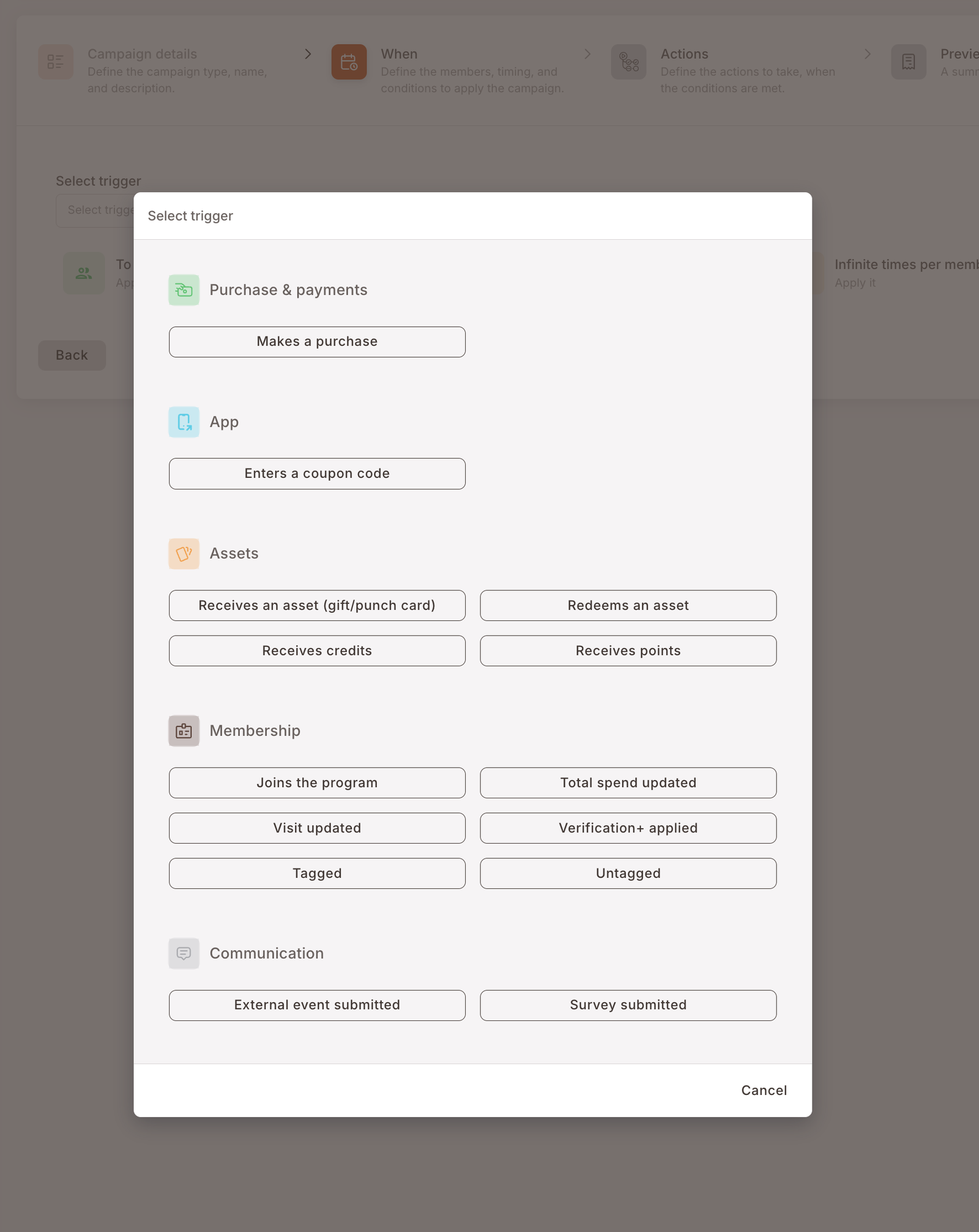
This page catalogs the 14 triggers available on the Rule wizard, grouped by the kind of event each one listens to, and for each one describes the kind of filters you can layer on top in the Conditions section. We deliberately don't enumerate every condition field per trigger — the field list is visible in the wizard dropdown and can change between releases. For the syntax of conditions (fields, operators, values, combining with AND/OR), see the separate Conditions reference.
How a trigger fits into a Rule
Every Rule on step 2 has four things to fill in, in this order:
- The trigger itself — picked from the dropdown at the top of step 2. Trigger-specific.
- Audience — who the Rule applies to. The default tile says To registered members. Trigger-agnostic.
- Timing — when the Rule can fire. The default tile says At any date and time. Trigger-agnostic.
- Rate cap — how many times a member can be affected. The default tile says Infinite times per member. Trigger-agnostic.
Below those four, the Conditions section shows a list of fields that are specific to the trigger you chose. Which fields appear depends on the trigger, and is described per-trigger below.
The three trigger-agnostic tiles above (audience, timing, rate cap) are the same on every trigger. If something you need to filter by is not one of those three and not in the trigger's condition list, it probably belongs in a case on step 3 — see Split into several cases.
At a glance
The Select trigger modal groups the 14 triggers into five categories:
| Category | Trigger | Fires when… |
|---|---|---|
| Purchase & payments | Makes a purchase | A purchase is submitted against the member at the POS. |
| App | Enters a coupon code | A member enters a coupon code in the app or at checkout. |
| Assets | Receives an asset (gift/punch card) | An asset — a gift, coupon, or punch card — is granted to the member. |
| Assets | Redeems an asset | A member redeems an asset they were previously granted. |
| Assets | Receives credits | The member's credit balance goes up. |
| Assets | Receives points | The member's point balance goes up. |
| Membership | Joins the program | A new member account is created. |
| Membership | Total spend updated | The member's lifetime-spend aggregate is recomputed. |
| Membership | Visit updated | The member's visit count is recomputed. |
| Membership | Verification+ applied | An email-domain OTP verification completes on the member's profile (e.g. used to recognise employees of a partner company — see details below). |
| Membership | Tagged | A tag is added to the member's profile. |
| Membership | Untagged | A tag is removed from the member's profile. |
| Communication | External event submitted | A partner system posts a custom event against the member via the external-event API. |
| Communication | Survey submitted | A member completes and submits a survey. |
Purchase & payments
Makes a purchase
Fires once per purchase submitted against the member at the POS
Fires every time a purchase is submitted against the member at the POS — i.e. when the POS calls the submit-purchase endpoint and the transaction is linked to a registered member.
Fires once per purchase. Multi-item baskets fire the trigger once, not once per item.
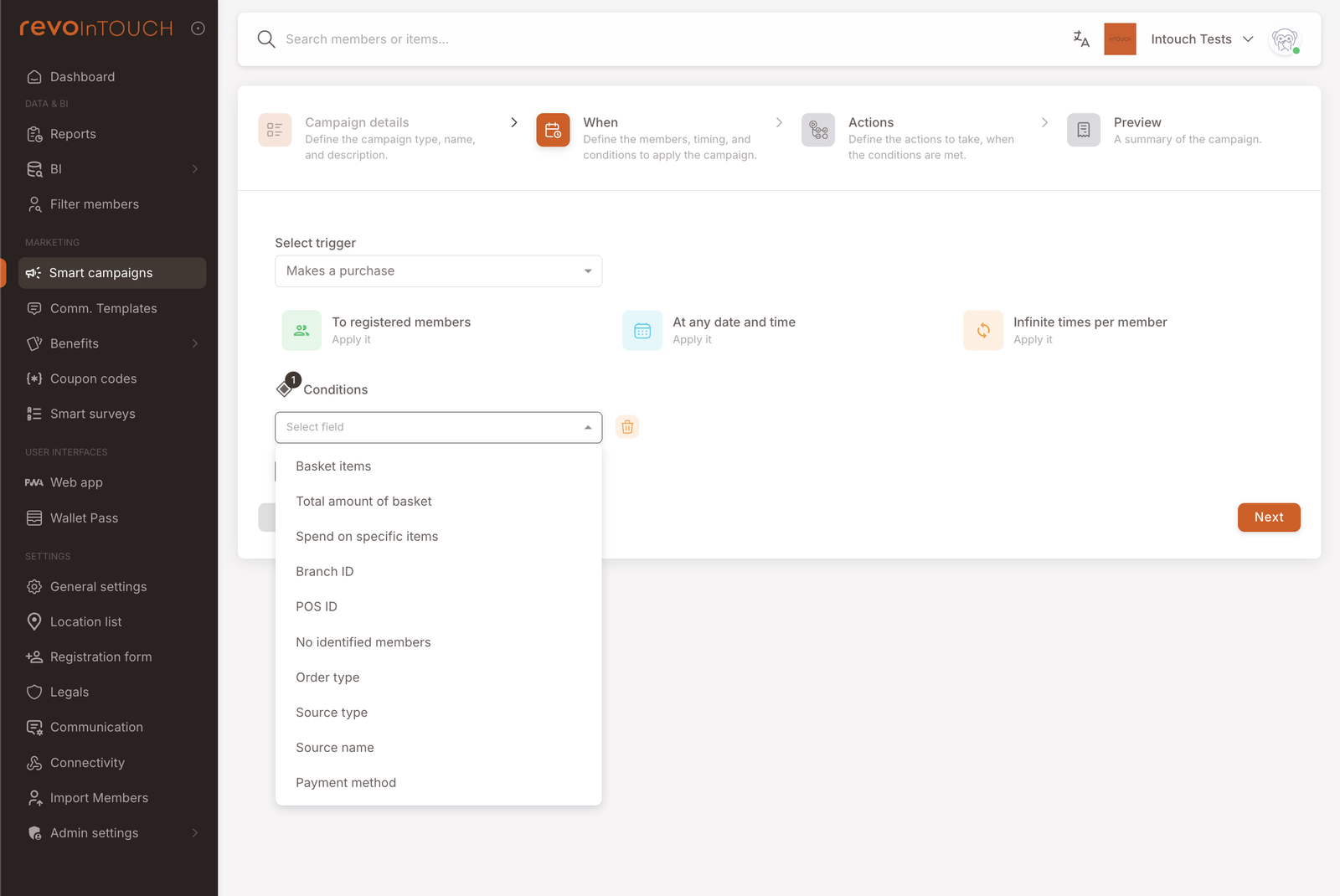
Filterable by: what was bought (basket items and spend on specific items), the size of the basket (total amount), where the purchase happened (branch, POS device), how the order was placed (order type, channel / source), and how it was paid (payment method — including the memberCredit exclusion that every accumulation Rule needs; see the Credits back + SMS playbook). The exact field list lives in the wizard's Condition dropdown.
Common pitfalls
- Ingestion delay. If the POS submits purchases in a batch (e.g. nightly), the Rule fires when the platform receives the purchase, not when the customer made it. Time-of-day conditions can misbehave in this setup.
- Anonymous sales. A purchase not tied to a member does not fire the Rule — the default audience filter (To registered members) silently drops them. If the member pulled out their loyalty card after the sale was rung up, the POS needs to either re-link or the sale is lost.
App
Enters a coupon code
Fires when a member enters a valid coupon code in the app, web, or at the POS
Fires when a member enters a valid coupon code — in the mobile app, the web app, or at the POS (depending on where coupon entry is wired). Invalid or unknown codes do not fire the trigger, so this is not a tool for fraud / typo monitoring.
Filterable by: the specific coupon code(s). The operator lets you list several codes in a single condition so the Rule fires when any of them is used.
Assets
The Assets category covers the four asset-balance events: a member gaining an asset, redeeming one, or having their credit / point balance change.
Receives an asset
Fires when a non-balance asset (gift, coupon, punch card) is granted to the member
Full name in the dropdown: Receives an asset (gift/punch card).
Fires when a non-balance asset — a gift, coupon, or punch card — is granted to the member, regardless of whether the grant came from another Rule, a manual admin action, or an import. It does not fire when the member receives credits or points; those have their own dedicated triggers (Receives credits, Receives points).
Filterable by: the specific asset (gift or punch card template) that was granted. Use this when the downstream flow should only react to your welcome gift and not to asset grants from other campaigns.
Redeems an asset
Fires when a member redeems a previously-granted asset
Fires when a member redeems an asset they were previously granted.
Filterable by: which asset was redeemed, and the channel it was redeemed through.
Receives credits
Fires when the member's credit balance goes up — from a Rule, a manual adjustment, or an import
Fires when the member's credit balance goes up — regardless of whether the credits came from an accumulation Rule, a manual adjustment, or an import.
Filterable by: the size of the grant (useful to separate small cashback events from big promotional top-ups) and the member's balance after the grant (useful for threshold messaging — "thanks, you've crossed $50 lifetime credits").
Receives points
Fires when the member's point balance goes up — same shape as Receives credits
Fires when the member's point balance goes up — regardless of whether the points came from an accumulation Rule, a manual adjustment, or an import.
Filterable by: the size of the grant and the member's balance after the grant — same shape as Receives credits, useful for threshold messaging at round-number milestones.
Membership
Membership triggers fire on changes to the member record itself — join events, aggregate updates, verification, and tag changes.
Joins the program
Fires once per member at account creation — no re-register event
Fires once per member, at account creation — when a person completes the the platform registration form (or the equivalent API call from a partner app) and a new member record is created. There is no "re-register" event.
Filterable by: the channel and specific source the registration came from (web, app, POS, partner integration, and so on). Use this to branch welcome flows by acquisition channel.
Total spend updated
Fires when the lifetime-spend aggregate is recomputed — for cumulative-threshold rewards
Fires when the member's lifetime-spend aggregate is recomputed — immediately after a purchase is ingested.
No condition fields on step 2. Filter with a case on step 3 if you need to narrow the Rule (e.g. fire the reward only when total spend has crossed a threshold).
Compared to Makes a purchase: use Makes a purchase for per-transaction rewards (10% back on this sale), and Total spend updated for cumulative-threshold rewards ("welcome to the $1,000 club" that fires once when lifetime spend crosses $1,000).
Visit updated
Fires when the visit count is recomputed — for visit-count thresholds
Fires when the member's visit count is recomputed. A visit is a purchase — this trigger is the count-based counterpart to Total spend updated (which is amount-based).
No condition fields on step 2. Filter with a case on step 3 if you need a visit-count threshold ("fire on the 10th visit").
Verification+ applied
Fires when an email-domain OTP verification completes — basis for "verified employees" patterns
Fires when Verification+ — the platform's email-domain verification via OTP — completes successfully on a member's profile. The member enters a work email address, the platform sends a one-time code to that address, the member enters the code back, and on success the member is considered "verified" as belonging to that email domain.
The common downstream pattern is to tag the member with the domain's name so other Rules can act on the verification. A typical worked flow:
- Company XYZ wants a 10% discount for its employees.
- You configure Verification+ for the
@companyxyz.comdomain, with a downstream action that applies theCompanyXYZtag on success. - A separate Rule uses Tagged as its trigger with Tag is CompanyXYZ as its condition, and Add discount (10%) as its action.
That two-Rule structure — Verification+ applied writes the tag; Tagged reads it — is the cleanest way to model "benefits for verified members of organization X" without hardcoding the company name into the discount Rule.
Filterable by: the specific Verification+ configuration whose OTP flow just completed. One condition can list several verification IDs and the Rule fires when any of them is the one that was applied — useful when you've configured separate Verification+ records for separate domains.
Tagged
Fires on the transition from untagged to tagged — basis for chained Rules
Fires when a tag is newly added to the member's profile — by another Rule, a segment rule, a manual admin action, or an import.
Fires only on the transition from untagged to tagged. If a member already has the tag and something re-applies it, the platform treats that as a no-op and the trigger stays silent. This matters for downstream Rules — a "send welcome-to-VIP SMS" Rule triggered by Tagged = VIP is safe to write because re-asserting the tag on an already-VIP member won't send the SMS a second time.
Filterable by: the specific tag that was added. The value picker offers the tags currently applied to any member in the tenant.
Pairing Tagged with a tag-adding action in a separate Rule is how you chain campaigns together. A first Rule ("Spent over $500 this month") ends by tagging the member big-spender. A second Rule triggers on Tagged = big-spender and sends a VIP SMS. This is cleaner than stacking everything into one monolithic Rule.
Untagged
Fires on the transition from tagged to untagged — for undoing perks or "we miss you" comms
Fires when a tag is removed from the member's profile. As with Tagged, this fires only on the real transition (tagged → untagged); removing a tag the member didn't have is a no-op.
Filterable by: the specific tag that was removed — same picker as Tagged.
Use this to undo a VIP perk when a member drops out of the segment, or to send a "we miss you" SMS when a member loses an active-customer tag.
Communication
External event submitted
Fires when a partner system posts a custom event via the external-event API
Fires when a partner system posts a custom event against the member via the platform's external-event API. This is the generic integration point for events that don't fit any of the other triggers.
Filterable by: event classification (type, sub-type, source) plus a bank of generic typed slots — string, numeric, date, and boolean — that the partner integration populates with whatever metadata the event carries. The typed-slot design is deliberate: the external-event API is schema-less on the the platform side, and the slots give you something predictable to build conditions against no matter what the partner posts. If the partner changes the shape of their events, only the type strings and slot mappings need to be updated — the Rule's overall shape stays the same.
The external-event slots are positional, not semantic. Your partner integration decides what each slot means for their events. Document the mapping somewhere — otherwise in six months no one will remember that the third numeric slot was "session duration in seconds".
Survey submitted
Fires when a member completes and submits a Smart Surveys survey
Fires when a member completes and submits a survey configured under Smart surveys.
Filterable by: the specific survey, picked from the tenant's configured surveys.
Pair this with a Send SMS action to thank members for taking the survey, or with an Add credits / Send asset action to reward completion (a Gift, a punch on a Punch card, or a credits top-up are all common "thank you for filling this in" rewards).
Looks like a trigger, isn't
A few things in the wizard are often mistaken for triggers:
- Audience (To registered members / To anyone) is not a trigger — it's an audience filter that runs on top of whichever trigger you picked.
- Timing (At any date and time / In a window) is not a trigger either. A campaign that should only run on weekends uses Makes a purchase as the trigger and weekends as a timing filter (or a case condition on step 3 — see cases).
- Scheduled and Future Campaign are campaign kinds, not triggers. If you want a campaign that fires on a date rather than on an event, pick one of those kinds on step 1 — they don't use the trigger model at all.