Scheduled: Win-back without RFM
Win back members who stopped buying without RFM: one tag, one recurring campaign and one Rule
Campaign 1, Scheduled: name it Winback Campaign.
- Specific time → Every 30 days, At a late-morning hour such as
11:00, Start date tomorrow or later. - To registered members → leave All registered members.
- Split into several cases:
- Case 1: Tags is one of
NoPurchaseand Tags is not one ofWinback_Sent→ Send asset (win-back Gift) + Send SMS + Tag memberWinback_Sent. - Case 2: Tags is not one of
NoPurchase→ Tag memberNoPurchase.
- Case 1: Tags is one of
Campaign 2, Rule: name it Untag NoPurchase.
- Trigger Makes a purchase → Specific members: Tags is one of
NoPurchase,Winback_Sent. - Untag member
NoPurchase+ Untag memberWinback_Sent.
Save both and set them Active. The first run only tags members; the first gifts go out one cycle later.
A win-back campaign has to find the members who stopped buying. With the Smart Segmentation add-on, RFM finds them for you, see Win-back cadence. Without it, the filter you would reach for does not exist: there is no "no purchase in the last 30 days", and Did not made a purchase takes fixed dates that never move on a repeating campaign (see the Scheduled overview).
This playbook gets the same result with a tag. Every member carries NoPurchase, and every purchase takes it off. So when the campaign comes round again 30 days later, anyone still carrying the tag has not bought since the last run. They get the win-back offer, and everyone else starts a new 30-day window.
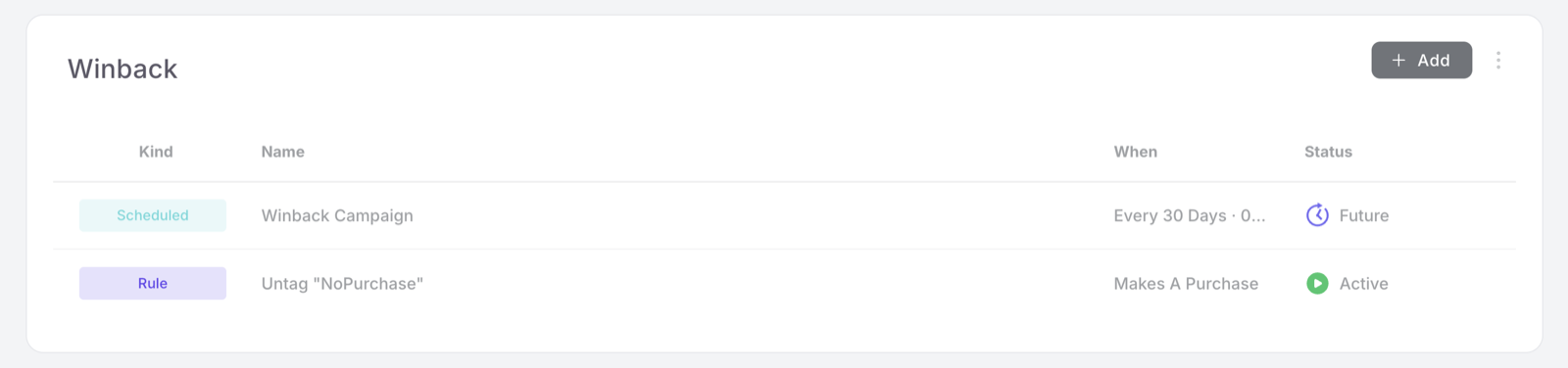
How the loop works
Two tags do all the work:
| Tag | Added by | Removed by | Means |
|---|---|---|---|
NoPurchase | The Scheduled campaign, case 2 | The Rule, on any purchase | Has not bought since the last run |
Winback_Sent | The Scheduled campaign, case 1 | The Rule, on any purchase | Already received the win-back offer for this absence |
On every run, the campaign looks at each member once and does one of three things:
| At the run, the member | What happens |
|---|---|
Bought since the last run, so carries no NoPurchase | Case 2: tagged NoPurchase, a new 30-day window starts |
Has not bought since the last run: carries NoPurchase only | Case 1: win-back Gift and SMS, tagged Winback_Sent |
| Already received the offer and still has not come back: carries both tags | No case matches, nothing is sent |
A member who joined since the last run carries no tags yet, so case 2 tags them. The earliest a new member can receive the offer is one full cycle later, never days after joining.
When a member who received the offer comes back and buys, the Rule removes both tags. If they drift away again later, they can be won back again.
The first run sends nothing. At launch no member carries NoPurchase yet, so the first run only tags everyone. The first offers go out on the second run, 30 days later, to the members who have not bought since the first one.
When to use this
Use it when your business does not have the Smart Segmentation add-on. With the add-on, RFM already knows who is drifting away and is tuned to your kind of venue, so use Win back At Risk and Win-back cadence instead.
The difference worth knowing: this playbook holds every member to the same window. A month without a purchase is a real lapse for a coffee regular but perfectly normal for a fine-dining guest, so pick the cadence that fits your venue, see Variations.
Before you start
2 prerequisites: a win-back Gift and an SMS template
- The win-back Gift exists under Benefits → Gifts, with a short expiry: a week or two. The example uses one called You've been missed!. Urgency lives on the Gift, not on the cadence. See Gifts.
- The SMS template exists under Comm. Templates. The example uses We missed you!, which tells the member a discount coupon is waiting in their wallet. See SMS template.
Walkthrough
Smart Campaigns live under Marketing → Smart campaigns. Keep the two campaigns together in one folder, for example Winback.
Part 1: the Scheduled campaign
Step 1: Campaign details
Kind Scheduled, name Winback Campaign. Use the description for the cadence and the offer: a recurring campaign's why is not visible anywhere else.
Step 2: When
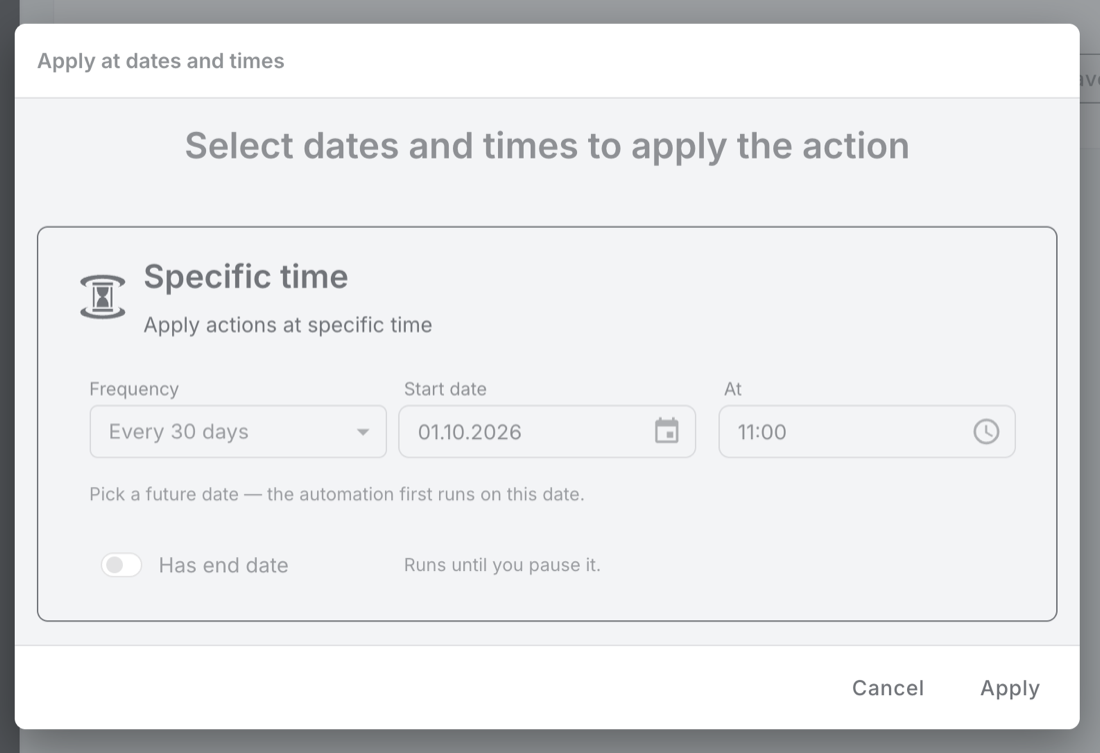
Open the Specific time tile:
- Frequency: Every 30 days.
- Start date: tomorrow or later. Every later run counts forward from this date.
- At: a late-morning hour such as
11:00, read in your business timezone. The SMS goes out at this time, so avoid early morning. - Has end date: leave it off.
Leave the To registered members tile on All registered members. Every member has to be checked on every run, the ones who bought as much as the ones who did not. The two cases in step 3 decide what happens to each.
Step 3: Actions, in two cases
Click Split into several cases before you add any action: switching it on later clears the actions you already built. Build the cases in the order below, because cases cannot be reordered afterwards. See Split into several cases.
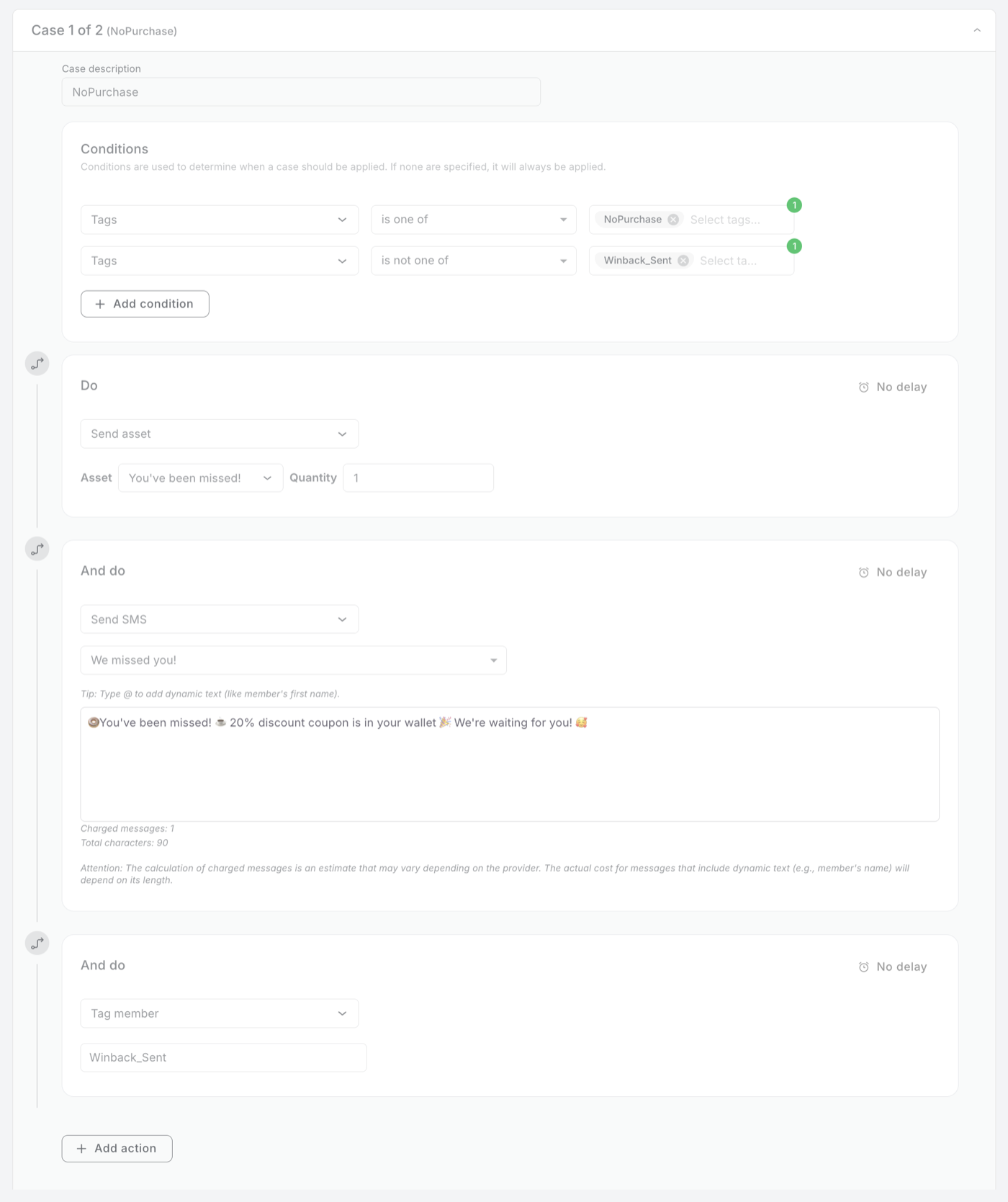
Case 1: no purchase since the last run
- Case description:
NoPurchase. - Conditions, both must hold:
- Tags is one of
NoPurchase - Tags is not one of
Winback_Sent
- Tags is one of
- Actions, stacked, all on No delay:
- Send asset → your win-back Gift, Quantity 1.
- Send SMS → your win-back template. Watch the Charged messages counter.
- Tag member →
Winback_Sent.
Case 2: bought since the last run, or new
- Case description:
Yes Purchase. - Condition: Tags is not one of
NoPurchase. - Action: Tag member →
NoPurchase. The screenshot delays it by 2 minutes; No delay works just as well.
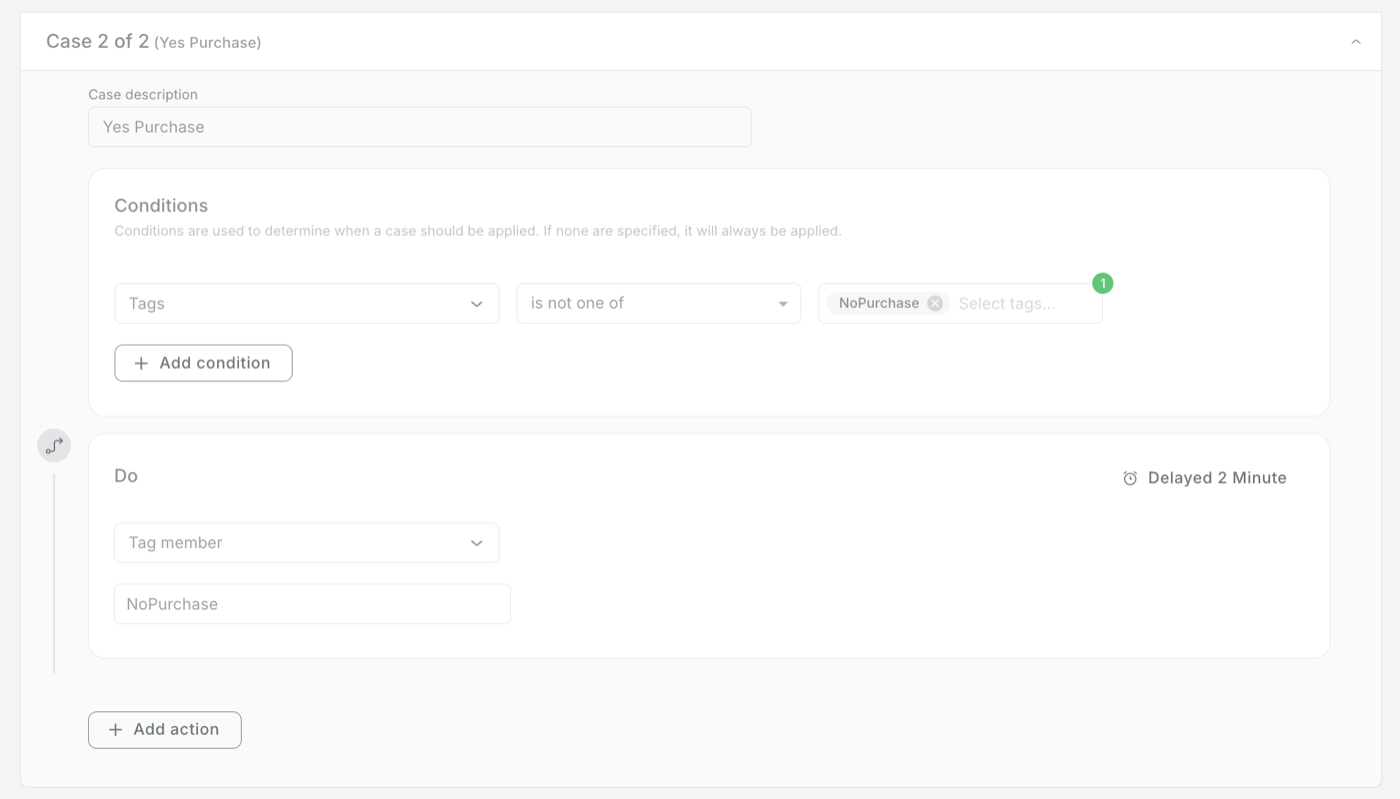
A member who received the offer and still has not come back carries both tags. Case 1 skips them because of Winback_Sent, and case 2 skips them because of NoPurchase, so the next runs send them nothing.
Step 4: Preview
Check that Apply to who reads All registered members, that the cadence line shows Every 30 days with your time, and that Actions shows 2 cases and 4 actions. Save, then set the campaign Active from the list. A Scheduled campaign left in Draft does not run.
Part 2: the Rule that resets the tags
Step 1: Campaign details
Kind Rule, name Untag NoPurchase.
Step 2: When
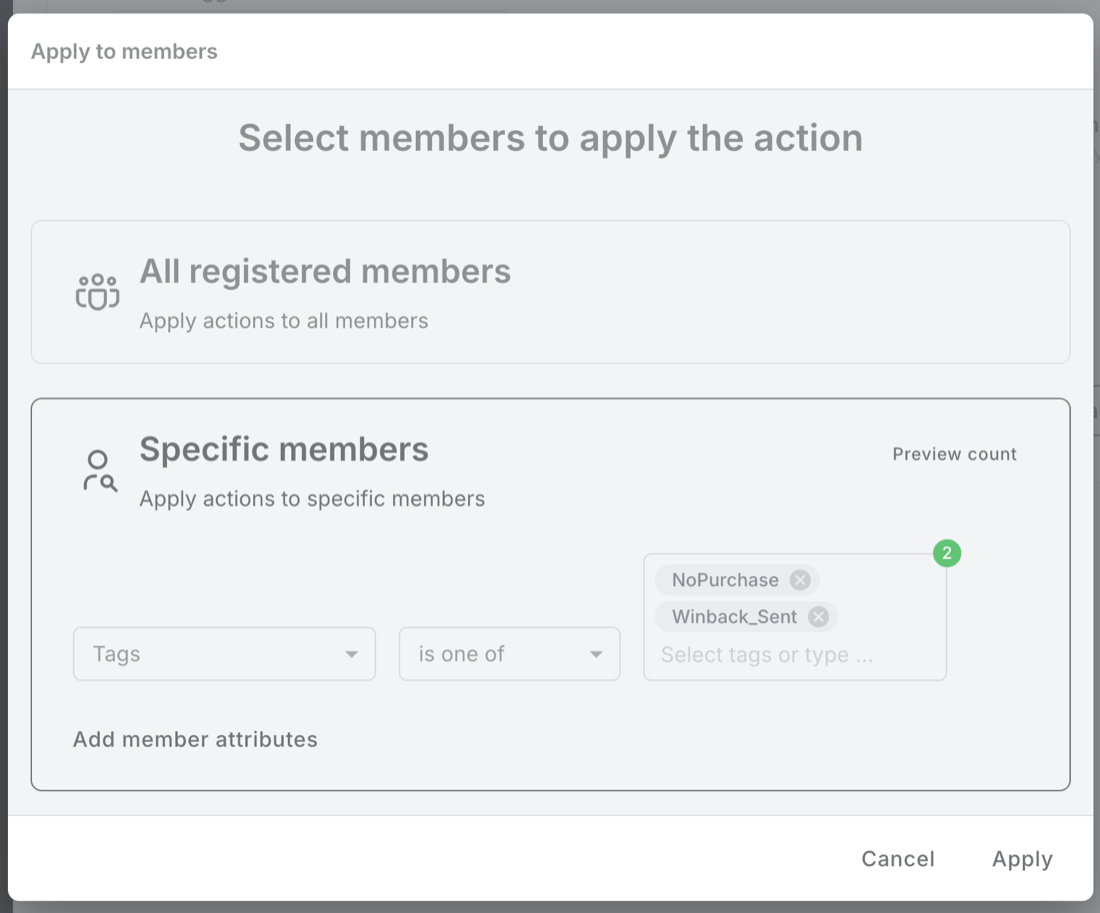
- Trigger: Makes a purchase.
- Audience: Specific members → Tags is one of
NoPurchase,Winback_Sent. - Timing: leave At any date and time.
- Rate cap: leave Infinite times per member. A member buys many times, and every purchase has to clear the tags.
Step 3: Actions
Two actions, stacked, both on No delay:
- Untag member →
NoPurchase. - Untag member →
Winback_Sent.
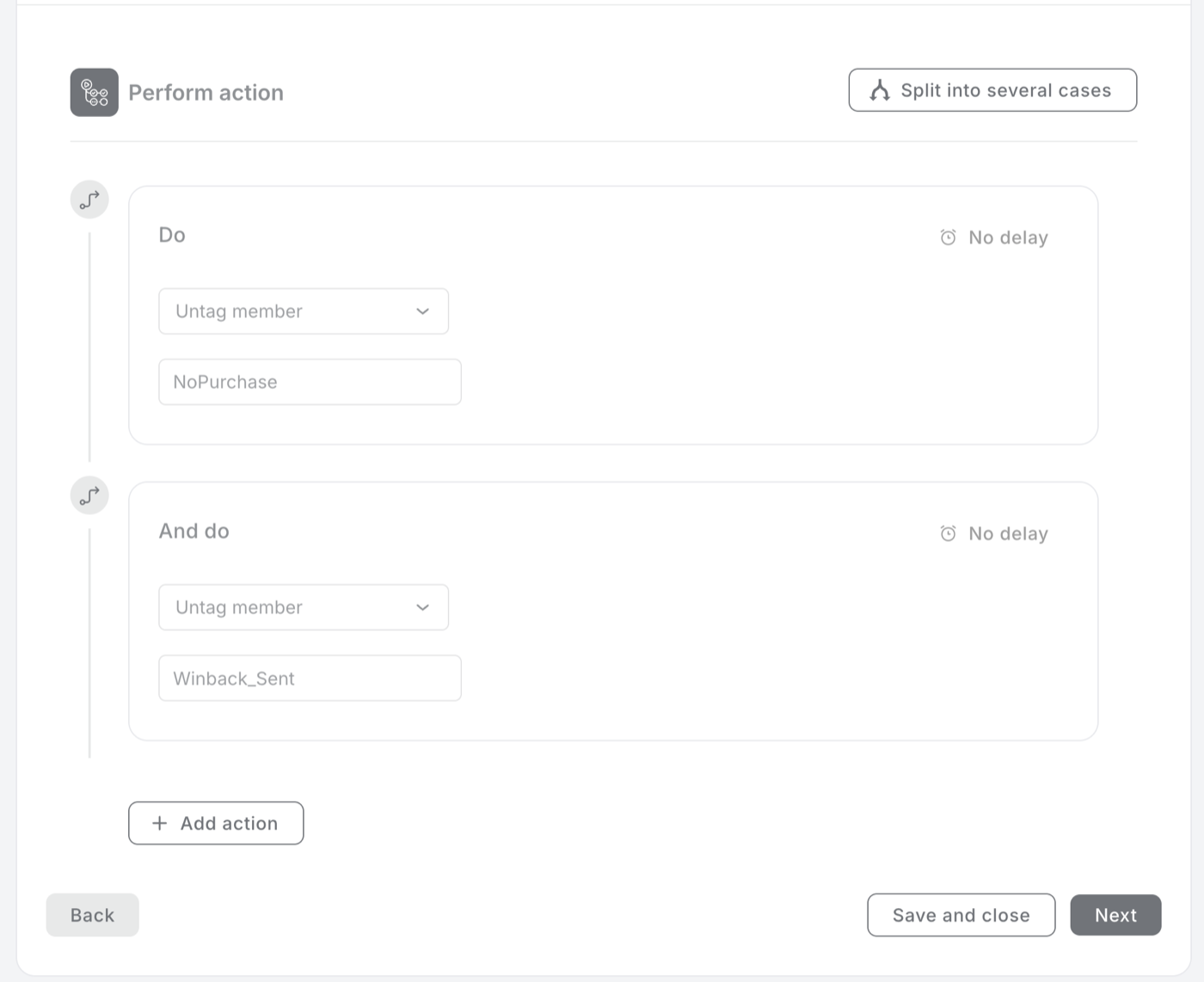
Action 2 is the one people forget. Without it, a member who came back keeps Winback_Sent, and the next time they stay away they carry both tags, match neither case, and are never won back again.
Step 4: Preview
Confirm the trigger reads Makes a purchase and the Rule has 2 actions. Save, then set it Active.
Before the first run
- Clear leftover tags. If
NoPurchaseorWinback_Sentalready sit on some members, from an earlier test for example, the first run treats them as lapsed and sends them the offer straight away. Find them in Filter members with Tags contains any of the two tags, and untag them before the start date. - Test on your own team first. Copy the Scheduled campaign, set the copy to Every day a few minutes ahead, and narrow its audience to Tags contains any of
test-user. Tag three test members before the run and check the result, following Testing a Scheduled campaign:
| The test member carries | Expected after the run |
|---|---|
test-user | NoPurchase added, nothing sent |
test-user, NoPurchase | Gift and SMS received, Winback_Sent added |
test-user, NoPurchase, Winback_Sent | Nothing |
Then make a purchase with the second test member: both NoPurchase and Winback_Sent should disappear. Pause the copy when you are done.
Measure it the right way
Count who came back, not who opened the SMS
Right after a run, Filter members on Tags contains any of Winback_Sent counts everyone who has received the offer and not bought since. Run the same filter again just before the next run. Every member who dropped out of that count bought in between, because only a purchase removes the tag. That drop is your win-back number.
Gift redemptions show how many members used the offer itself. The platform does not yet record which campaign issued a Gift, so revenue cannot be tied to this campaign exactly.
Variations
3 tweaks: a slower cadence, email instead of SMS, keeping staff out
A slower cadence for occasional venues. Every 30 days suits cafés and quick service, where a month without a visit really is a lapse. For a venue guests visit a few times a year, use Every 90 days: the time between runs is how long a member can go without buying before they count as lapsed.
Email instead of SMS, or both. Swap Send SMS in case 1 for Send email, or stack both. Members only receive messages on channels they have consented to.
Keep staff and test members out. Add a third condition to case 1, Tags is not one of staff (or whichever tag you use for the team), so nobody on your side receives win-back offers.
Gotchas
5 things that commonly trip people up
- Do not tag members when they join. Adding
NoPurchaseat signup with a Rule on Joins the program looks tidy, but a member who joins two days before a run then receives "You've been missed!" two days later. The campaign tags new members on its next run, which gives everyone a full cycle first. - The Rule has to remove both tags. Leave out Untag member
Winback_Sentand a member can only ever be won back once. - Tag names must match exactly. Tags are case-sensitive:
NoPurchase,nopurchaseandNo Purchaseare three different tags. Use the same spelling in the conditions, the actions and the Rule. - Only identified purchases count. A member who buys without identifying themselves keeps
NoPurchaseand can receive a win-back offer even though they visited. - Paused runs are lost. A run that falls during a pause does not catch up when you resume, and a campaign runs at most once per calendar day.