Manual actions on a member
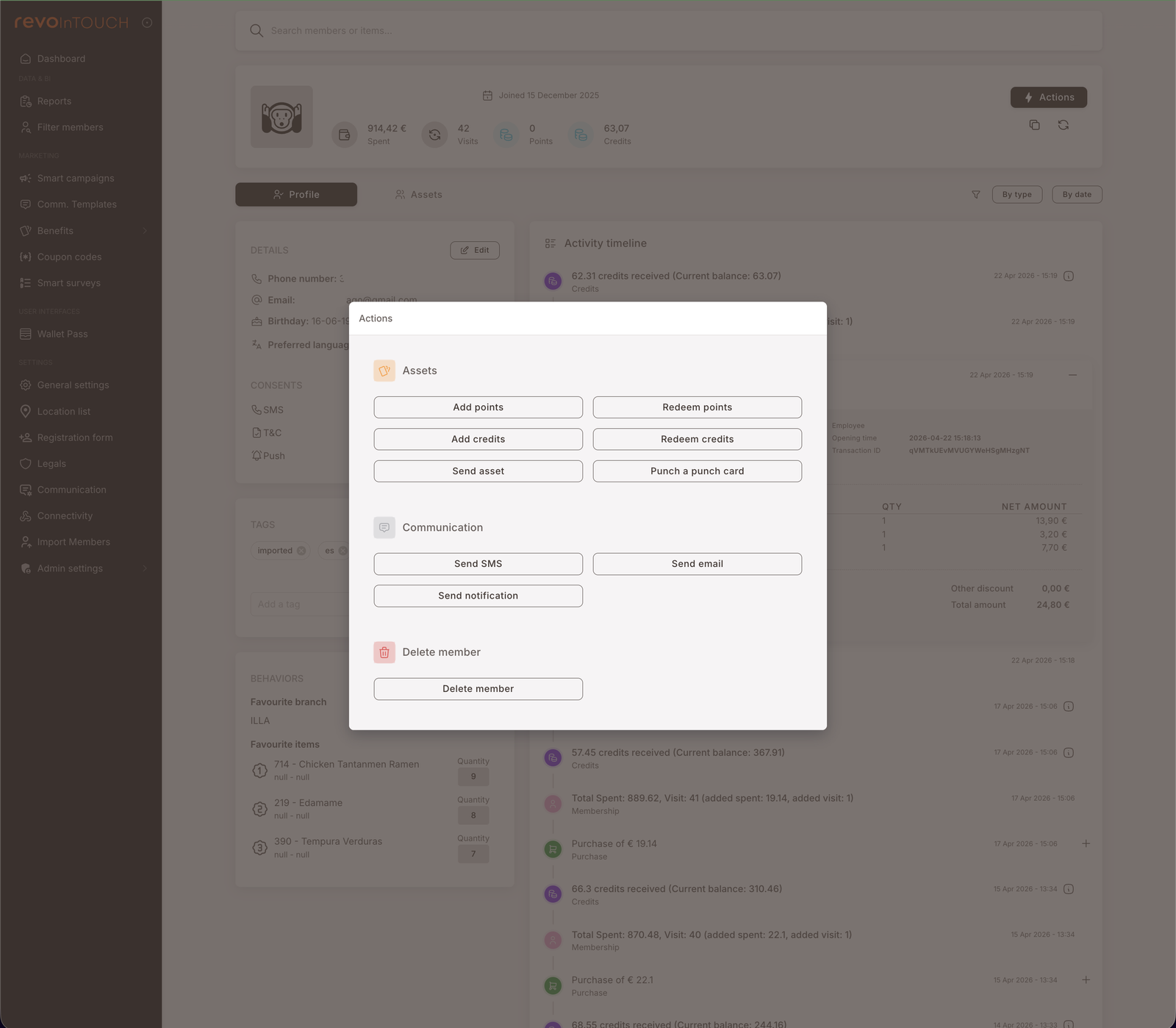
The Actions button on a member profile opens a modal that lets you fire one operation against this one member, immediately — no campaign, no audience, no schedule. Three categories: Assets (Add / Redeem points or credits, Send asset, Punch a punch card), Communication (Send SMS / email / notification), Delete member. Use it for service touches, demos, and one-off corrections that don't justify a Smart Campaign.
Manual actions are the per-member equivalent of a Smart Campaign action — the same things a Rule could do, but fired by you, against one member, right now. They bypass the audience / trigger / case machinery entirely; you click, the action runs.
Walkthrough
Open the member profile of the person you want to act on, then click the Actions button in the top right. A modal opens with three sections.
Assets
Six asset-shaped operations:
- Add points — grant a points balance increase to this member. Useful for service corrections ("add 100 points to make up for the bug") and one-off promos ("give this member 500 points as a launch gift").
- Redeem points — manually deduct points. Mirror of Add points; used when something redeemed off-system needs to be reflected back in the balance.
- Add credits — grant a credits balance increase. Same shape as Add points but for the credit currency.
- Redeem credits — manually deduct credits.
- Send asset — issue a Gift to this member from the Benefits → Gifts library. The picker shows your existing Gifts; pick one and it lands in the member's wallet.
- Punch a punch card — add a punch to the member's active card from the Benefits → Punch cards library. If the member doesn't have an active card, an empty one is auto-issued and the first punch applied (same behaviour as the Punch a punch card Rule action).
Communication
Three send-shaped operations. Each picks from the same template library as the Smart Campaigns equivalent action — and for SMS and Notification, you can also write a custom message directly in the modal without saving a template first.
- Send SMS — text this one member. Choose a saved SMS template, or switch the source to Custom and type the body inline.
- Send email — pick from a saved Email template. Email is template-only — no Custom option (same as the Send email action on a Smart Campaign). Email is a paid service the same way it is on a campaign send.
- Send notification — pick from a saved Notification template, or switch the source to Custom and write the notification directly.
Delete member
One action:
- Delete member — removes the member from the program. Irreversible.
Use this for compliance requests (GDPR right-to-erasure), test-account cleanup, and duplicate-account merges.
When to reach for a manual action
Manual actions are right for:
- Service touches — "add 50 credits to apologise for the wait", "send this member a 10€ Gift to thank them for the feedback".
- Demos — showing a partner or prospect what an SMS / email looks like, by sending it to a real test member.
- Corrections — fixing balances after a POS sync issue, manually issuing an asset that should have come through a Rule but didn't.
- One-offs — anything that should happen exactly once, to one specific person. If it should happen to more than one member, even just two, consider Filter members → One-time action instead. If it should happen more than once on a trigger or schedule, that's a Smart Campaign.
Manual actions are wrong for:
- Anything you'd want to repeat for the next member who walks in. Build a Rule.
- Anything you'd want to send to a population. Build a Future Campaign or use Filter members.
- Anything that needs to fire automatically on an event. Build a Rule.
Gotchas
4 things to watch for
- The operator behind a manual action is hidden by default — but recoverable. Manual actions show up in the member's activity timeline alongside Rule-driven actions and look identical on the surface (a credit grant looks the same whether a Rule did it or you clicked the button). To see who on your team performed it, click the small ℹ️ icon next to the log entry — it expands a detail panel that includes the operator's account.
- Manual actions don't fire Rules. A Send asset fired manually is a one-off; it doesn't trigger a Rule listening on "asset received" or similar. The cascade-of-actions behaviour you'd get from a Rule chain isn't replicated when you do the equivalent manually.
- Delete member is irreversible. The button doesn't double-confirm in any unusual way; clicking deletes. Use the
test-usertag pattern to mark scratch members and consider a tag-based bulk-delete approach over individual clicks if you're cleaning up many. - Communication consents are still enforced. Manually sending an SMS to a member who hasn't given SMS consent will be blocked at delivery, the same way a Rule's send would be. The action button doesn't override consent.